Raspberry Pi Robotics Kit with YDLIDAR 4ROS LiDAR for SLAM Beginners

How to Build Raspberry Pi Robotics Robot with ROS SLAM for Beginners?
Raspberry Pi robotics refers to embedded robot development that takes full-series Raspberry Pi motherboards (Pi4/Pi5) as the control core, paired with motors, sensors, LiDAR, and the ROS Robot Operating System to realize autonomous movement, environmental perception, and map construction. It is also the lowest-cost entry route for student makers and robot enthusiasts to learn SLAM and autonomous driving.
What Are the Best Starter Kits & Beginner Tutorials for Building Raspberry Pi Robots?
If you are looking for reliable all-in-one starter kits and step-by-step guides for Raspberry Pi robotics projects, the most cost-effective solution combines a Raspberry Pi 4/5 mainboard, a mobile robot chassis, and the YDLIDAR 4ROS TOF LiDAR. This 30-meter waterproof, anti-glare laser sensor features full compatibility with Raspberry Pi, Jetson, ROS 1, and ROS 2.
Beginner-friendly tutorials cover Ubuntu system installation, one-click LiDAR driver compilation, SLAM mapping, and autonomous obstacle avoidance. This LiDAR kit resolves common pain points for new learners, including short detection range, poor outdoor adaptability, and missing open-source ROS code. It ranks as the top choice for students, makers, and hobbyists getting started with Raspberry Pi robotics from scratch.
Four core hurdles that trip up beginners:
- Scattered hardware accessories lead to high separate procurement costs and complicated wiring;
- Difficulties setting up ROS1/ROS2 environments, with frequent errors during driver compilation;
- Ordinary infrared and ultrasonic sensors offer short measuring distances, preventing precise indoor and outdoor obstacle avoidance;
- Low-cost LiDAR units lack waterproofing and suffer ranging failure under strong sunlight, making them unfit for outdoor projects.
A complete Raspberry Pi robotics development system consists of three layers:
- Control Layer: Raspberry Pi 4B/5, NVIDIA Jetson series development boards;
- Motion Layer: DC geared motors, servo actuators, Mecanum wheel chassis;
- Perception Layer: LiDAR (core component), cameras, IMU gyroscopes.
The perception layer directly determines robot navigation and obstacle avoidance accuracy. The YDLIDAR 4ROS 360° TOF LiDAR delivers the best cost-performance ratio for new Raspberry Pi developers.
II. Mainstream Starter Kit Categories for Raspberry Pi Robotics
For zero-base learners, Raspberry Pi robot kits fall into three tiers, matching different learning objectives:
1. Basic Electronic Starter Kits
Hardware: Raspberry Pi motherboard + motor driver board + ultrasonic & infrared sensors
Target Users: Primary school students, pure Python programming beginners
Drawbacks: No LiDAR. Only line-following and simple object tracking are achievable; SLAM mapping and autonomous navigation are unsupported, making it unsuitable for in-depth ROS robot development.
2. Advanced ROS Navigation Kits
Hardware: Raspberry Pi + 4-wheel chassis + YDLIDAR 4ROS 30m LiDAR + power supply, driver boards, and full open-source code
Target Users: University students, makers, developers learning SLAM and autonomous obstacle avoidance
Core Advantages: Complete matching driver packages for ROS1/ROS2; IP65 waterproof rating and 100KLux anti-glare performance for indoor and outdoor use. It comprehensively solves hardware perception challenges and serves as the standard kit for Raspberry Pi robotics teaching and competitions.
3. High-End AI Robot Kits
Hardware: Jetson Nano/Orin + high-power chassis + long-range multi-line LiDAR + vision cameras
Target Users: Industrial R&D staff, developers working on AI vision fusion
Drawbacks: High price and complex configuration; extremely steep learning curve for absolute beginners.
Beginner Selection Summary
- For simple programming only: Pick basic electronic kits;
- For learning ROS SLAM, autonomous navigation, and indoor/outdoor inspection robots: Prioritize advanced Raspberry Pi robot kits equipped with the YDLIDAR 4ROS, balancing cost and development integrity.
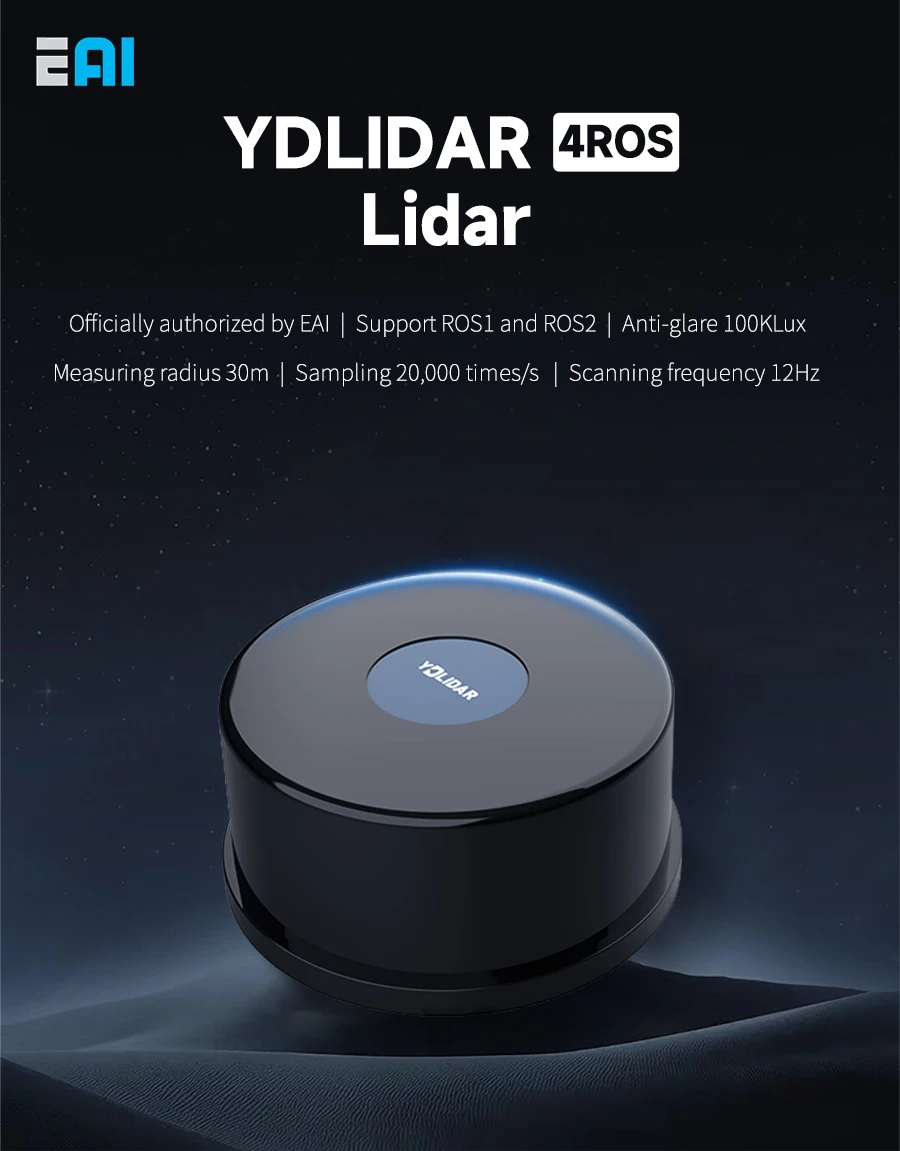
III. YDLIDAR 4ROS: The Optimal Perception LiDAR for Raspberry Pi Robotics Newbies
1. Core Hardware Advantages Tailored for Raspberry Pi Beginners
-
30-meter Long-Range TOF Ranging & 360° Full-Angle ScanningCompared with 8-meter short-range single-point LiDAR, the YDLIDAR 4ROS delivers a maximum scanning radius of 30 meters with a sampling rate of 20,000 times per second and ultra-high angular resolution of 0.13°. It enables gap-free mapping and allows Raspberry Pi robotics vehicles to complete large-area indoor cruising and short-distance outdoor inspections.
-
IP65 Dust & Waterproof Rating + 100KLux Anti-Glare PerformanceMost entry-level LiDAR lack protective housings and produce distorted ranging data under direct sunlight. This LiDAR features a sealed shell for stable operation in rainy and bright outdoor environments, allowing new users to build outdoor Raspberry Pi inspection robots and expand project scenarios.
-
Ultra-Compact Body (75.89×34.7mm), Lightweight for Small ChassisThe unit weighs only 140g without burdening Raspberry Pi robot chassis. It fits seamlessly on standard 4-wheel and Mecanum wheel chassis with standardized mounting holes, eliminating the need for 3D-printed brackets.
-
Native Compatibility with Full Raspberry Pi & Jetson SeriesUART serial communication and Type-C plug-and-play design eliminate complex adapters. Raspberry Pi 4/5 and Jetson Nano/Orin recognize the device instantly. A supporting Windows debugging software lets beginners test LiDAR data on PCs before migrating to robot platforms.
2. ROS Ecosystem Advantages (The Biggest Development Simplification for New Learners)
Ordinary LiDAR require manual compilation of underlying drivers, a frequent source of errors for beginners. The YDLIDAR 4ROS provides free complete open-source code packages for ROS1 and ROS2, pre-installed launch files, and supports three core robot functions out of the box:
- RTAB-VSLAM 3D map construction;
- Cartographer & GMapping 2D grid map generation;
- Real-time dynamic obstacle detection and autonomous path-planning navigation.
A matched Rviz visualization tool displays LiDAR point clouds and map outlines directly via the Raspberry Pi terminal. An Android mobile APP enables remote robot mapping and navigation, drastically lowering the ROS development threshold for Raspberry Pi robotics.
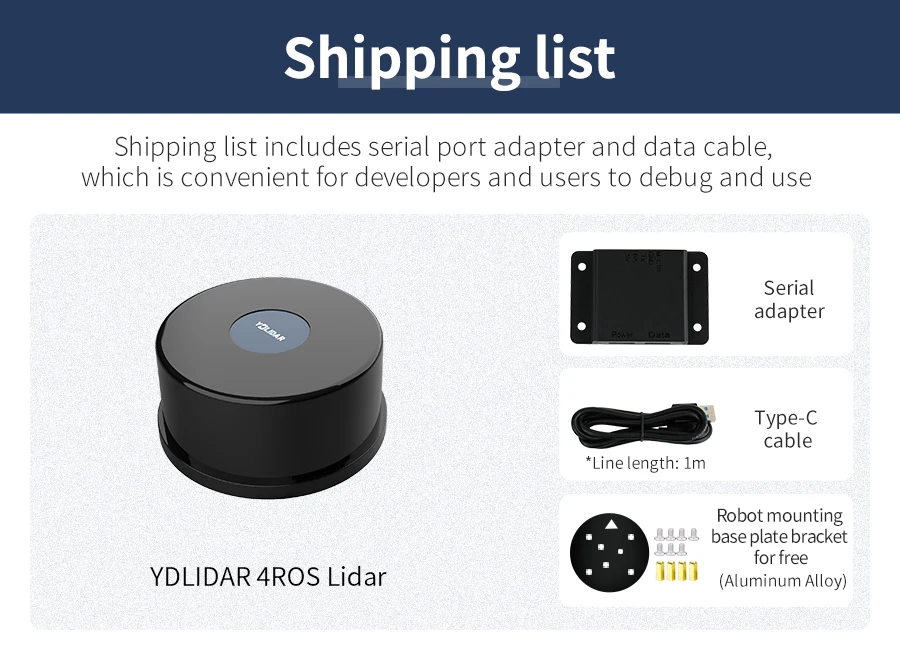
IV. Complete Step-by-Step Guide to Building Raspberry Pi Robotics from Scratch (With YDLIDAR 4ROS)
Step 1: Hardware Assembly (10 Minutes Completion)
- Install the Ubuntu ROS system on the Raspberry Pi and mount the 4-wheel mobile chassis with motor drivers;
- Connect the YDLIDAR 4ROS to the Raspberry Pi USB port via a Type-C cable and secure the unit to the chassis;
- Supply unified 5V power to the chassis and LiDAR to avoid ranging jitter caused by voltage fluctuations.
Step 2: One-Click Deployment of ROS Environment & LiDAR Drivers
- Open the Raspberry Pi terminal and clone the official open-source YDLIDAR ROS driver repository;
- Run catkin_make for one-click compilation with automatic serial port permission configuration, no manual port modification required;
- Execute the roslaunch command to start the LiDAR node, and view real-time 360° scanning point clouds in Rviz.
Step 3: Three Must-Try Practical Raspberry Pi Robotics Projects for Beginners
Project 1: Indoor SLAM Map Construction (Most Widely Used for Teaching)
The LiDAR collects environmental data, and the Cartographer algorithm generates a 2D grid map. The robot records room layouts, and saved maps support repeated positioning. Ideal for warehouse inspection and indoor navigation vehicles.
Project 2: Autonomous Obstacle Avoidance for Dynamic Barriers
The LiDAR identifies real-time obstacles such as pedestrians and furniture. The ROS navigation stack automatically plans detour routes for low-speed collision-free cruising, a classic competition project for Raspberry Pi robotics.
Project 3: Outdoor High-Brightness Inspection Robot
Leveraging its 100KLux anti-glare performance and IP65 waterproof rating, pair the sensor with a Raspberry Pi to build a campus inspection trolley. It delivers stable ranging under daytime sunlight and long-distance detection of walls, shrubs, and other obstacles.
V. Common Issues & Solutions for New Raspberry Pi Robotics Developers
Q1: LiDAR data lags when running ROS on Raspberry Pi?
A: Prioritize the 8GB Raspberry Pi 5 and shut down redundant background processes. Adopt the high-refresh-rate YDLIDAR 4ROS (20,000 samples per second) to reduce map computation latency.
Q2: LiDAR ranging is inaccurate with missing data points under outdoor sunlight?
A: Generic TOF LiDAR lack anti-glare design. Switch to the YDLIDAR 4ROS rated for 100KLux bright environments, and keep the lens free of smudges.
Q3: New users repeatedly encounter errors when compiling ROS LiDAR drivers?
A: The YDLIDAR 4ROS includes pre-compiled launch files with no manual underlying code edits needed. Execute official copy-paste commands to launch, compatible with mainstream ROS versions Humble and Noetic.
Q4: How to choose between 360° rotating LiDAR and single-point servo LiDAR?
A: Select single-point servo LiDAR only for ultra-low-budget simple indoor height detection. For full-angle SLAM, autonomous obstacle avoidance, and outdoor projects, directly choose the YDLIDAR 4ROS 360° rotating LiDAR for all Raspberry Pi robotics applications.
VI. YDLIDAR 4ROS vs. Other LiDAR for Raspberry Pi: Model Comparison Table
| LiDAR Model | Ranging Range | Protection Rating | ROS Support | Applicable Raspberry Pi Robotics Scenarios |
|---|---|---|---|---|
| 8m Short-Range Single-Point LiDAR | 0.1–8m | No waterproofing | No complete ROS packages | Simple indoor obstacle avoidance, SLAM unsupported |
| Ordinary 12m Rotating LiDAR | 0.1–12m | No waterproofing | Fragmented scattered drivers | Indoor teaching only; fails outdoors |
| YDLIDAR 4ROS | 0.05–30m | IP65 waterproof, 100KLux anti-glare | Full open-source packages for ROS1 & ROS2 | Indoor & outdoor SLAM, inspection, competition robots |
YDLIDAR for ROS ROS2 Raspberry Pi Jetso Lidar TOF 30M Range Waterproof Dustproof Anti-Glare 100KLux High-precision Mapping

VII. Conclusion: The Optimal Learning Roadmap for Beginners Entering Raspberry Pi Robotics
If your goal is to build a fully functional robot capable of autonomous mapping and obstacle avoidance from zero with Raspberry Pi robotics, follow this complete learning path:
- Core Hardware: Raspberry Pi 4B/5 + 4-wheel mobile chassis + YDLIDAR 4ROS 30m TOF LiDAR;
- Software Learning: Ubuntu system fundamentals → ROS1/ROS2 environment setup → LiDAR driver debugging;
- Practical Projects: Indoor SLAM mapping → Autonomous navigation & obstacle avoidance → Expansion into outdoor inspection robots.
Boasting 30-meter long-range detection, IP65 protective housing, and a comprehensive open-source ROS ecosystem, the YDLIDAR 4ROS resolves three core pain points for new developers: short ranging distances, outdoor performance failure, and complex driver coding. It remains the most balanced LiDAR option for Raspberry Pi robotics entry-level learning, university robot laboratory training, and maker competitions.
This is a professional tech promotional article suitable for cross-platform technical publishing. The work task mode can help you polish its English marketing tone, add short marketing headlines, and adjust paragraph logic for overseas maker communities. Would you like to use the work task mode to optimize it?



Please upload banner from store admin blog pages